What is iphone-control?
iphone-control lets an AI agent such as Claude use a real iPhone that is plugged into a Linux machine: look at the screen, tap buttons, type, open apps — like a person holding the phone.
It works as a set of MCP (Model Context Protocol) tools, so any MCP client — Claude Code, Claude Desktop, Cursor and others — can use it directly.
What you can do with it
- Let an agent get things done on the phone: look things up, fill in forms, change settings, play games.
- Test your own app or website on a real device without a Mac.
- Turn a spare iPhone into a device you can script remotely.
How it works
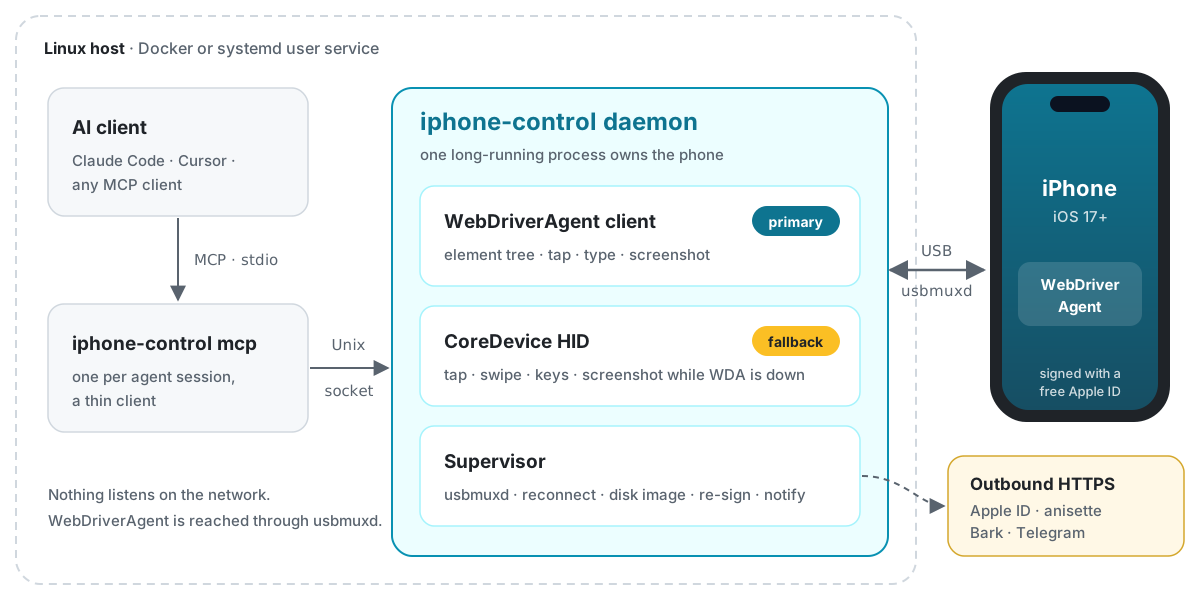
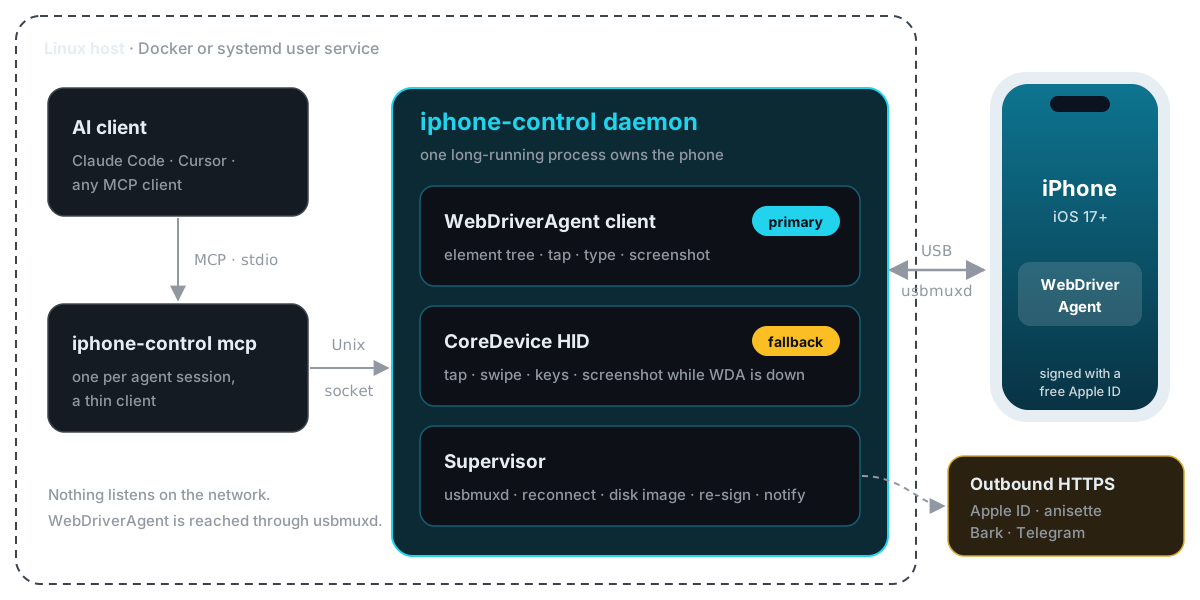
- A daemon runs all the time and owns the phone: it pairs, mounts the Developer Disk Image, opens a tunnel, and runs WebDriverAgent (WDA, an agent on top of Apple's XCTest automation) on the phone to read the screen, tap and type.
- The MCP server is started by the AI client on demand and simply forwards tool calls to the daemon.
- WDA is signed with your free Apple ID. Free signatures expire after 7 days; the daemon re-signs before that.
- While WDA is unavailable (for example while it restarts), taps, swipes, buttons and screenshots go through CoreDevice HID instead.
Compatibility
| Host | Linux, x86_64 or arm64; Docker (Compose v2), or Rust 1.88+ to build from source |
| Phone | iOS 17 or later |
| Verified on | iPhone 15 Pro Max, iOS 27.0.1 |
| Account | A free Apple ID; a dedicated one is recommended |
Other models and iOS versions should work but are untested — reports are welcome.
Output language
The CLI, doctor output and MCP tool results are currently in Simplified Chinese. Agents handle this fine.
What it does not do
- It does not bypass any iOS security: trusting the computer, enabling Developer Mode, trusting the developer certificate and enabling UI automation each need you on the phone once.
- The first unlock after a reboot (BFU) always needs a person.
- Games, maps and video have no element tree; agents work from screenshots and coordinates there.
Next: Getting Started.